 Reset Password
1.1
Reset Password
1.1
This application resets the lock password to 0000.
How to use
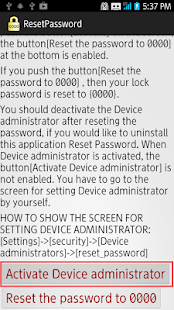
1.Run application,push button[Activate Device administrator].
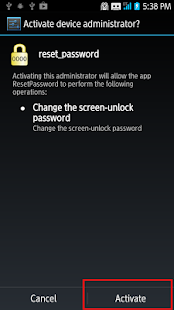
2.The screen for setting Device administrator is displayed. Push the button[activate].
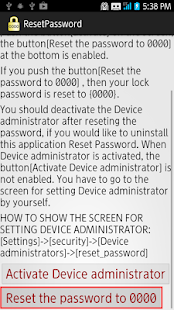
3.Push the button[Reset the password to 0000].
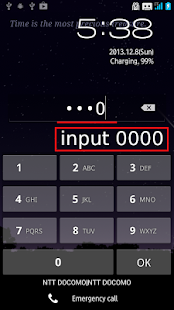
4.The password is reset to 0000. Change the password immediately.
This application requires a permission "Device Administration".
Permitting "Device Administration" makes changing the password possible.
This is my experience.
I tried to put a lock on the smartphone,
but there is a message that you have to input the password to put a lock on the screen.
I was troubled.
I inputed some passwords,but they were useless.
Maybe in the past I set a password but not put a lock.
But I forget the password.
This problem was solved by using this application.
It is worth trying this application for Those who are facing similar problems.
How to use
1.Run application,push button[Activate Device administrator].
2.The screen for setting Device administrator is displayed. Push the button[activate].
3.Push the button[Reset the password to 0000].
4.The password is reset to 0000. Change the password immediately.
This application requires a permission "Device Administration".
Permitting "Device Administration" makes changing the password possible.
This is my experience.
I tried to put a lock on the smartphone,
but there is a message that you have to input the password to put a lock on the screen.
I was troubled.
I inputed some passwords,but they were useless.
Maybe in the past I set a password but not put a lock.
But I forget the password.
This problem was solved by using this application.
It is worth trying this application for Those who are facing similar problems.
Celkové hodnocení
Sdílet
Souhrnné informace o Reset Password
-
Verze programu
1.1 -
Autor
-
Potřeba instalace
ano -
Velikost souboru
192 kB -
Jazyk
- Angličtina ,
- Japonština
-
Staženo
2× celkem
1× tento měsíc -
Poslední aktualizace
14. 8. 2017