A360 - View CAD files
3.5.1
A360 - View CAD files
3.5.1
Autodesk A360 was designed specifically for architects, engineers and designers to comment, markup and collaborate 2D & 3D CAD models. With over 100 CAD file and additional file formats supported, A360 allows you to upload and view any file you have, no matter what software you used to create it. Whether you’re at the office, or doing fieldwork, you can take A360 with you and stay up-to-date with your projects.
What's so great about A360?
View 2D & 3D CAD models:
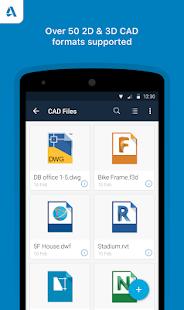
• View over 50 different CAD file formats including: AutoCAD (DWG), DWF, Inventor (IPT, IAM, IDW), Revit (RVT), SolidWorks (SLDPRT, SLDASM, ASM), Navisworks (NWD, NWC), CATIA (CATPART, CATPRODUCT), Fusion 360 (F3D) and more
• Upload and view CAD models from email attachments
• Upload and view CAD models from device’s local storage, Dropbox, Box, Buzzsaw, OneDrive etc.
Navigate large-scale 2D & 3D CAD models:
• Isolate and present object properties
• Navigate model parts and layers
• Measure the distance, angle or area between points in your drawing
• Intuitive touch-based navigation including: zoom, pan, orbit and rotate 3D models
Collaborate with your clients, colleagues and others all-in-one place:
• Review & markup your designs for easy collaboration
• Comment directly on your designs and keep track of changes
• Take and upload photos directly from the device to your account to document work progress
• Invite new members to join your project in progress and collaborate on designs
• Share any CAD file type directly from your Android device, including: AutoCAD (DWG),DWF, Solidworks, Revit, CATIA and more
Track project status anytime, anywhere:
• Cloud-based storage with offline data access
• Online and offline workflows, allowing you and your team to always stay up-to-date with recent changes and updates
We respect your privacy, and would like permissions to access the following capabilities and information:
• Accounts: Using the Android Account Manager helps us manage your Autodesk account easily, and allow other Autodesk applications to connect, using your Autodesk account.
• Storage: Store offline data if needed, so you can view your data anywhere, anytime.
• Photos: Access files or data stored on your device to view, share and markup.
What's so great about A360?
View 2D & 3D CAD models:
• View over 50 different CAD file formats including: AutoCAD (DWG), DWF, Inventor (IPT, IAM, IDW), Revit (RVT), SolidWorks (SLDPRT, SLDASM, ASM), Navisworks (NWD, NWC), CATIA (CATPART, CATPRODUCT), Fusion 360 (F3D) and more
• Upload and view CAD models from email attachments
• Upload and view CAD models from device’s local storage, Dropbox, Box, Buzzsaw, OneDrive etc.
Navigate large-scale 2D & 3D CAD models:
• Isolate and present object properties
• Navigate model parts and layers
• Measure the distance, angle or area between points in your drawing
• Intuitive touch-based navigation including: zoom, pan, orbit and rotate 3D models
Collaborate with your clients, colleagues and others all-in-one place:
• Review & markup your designs for easy collaboration
• Comment directly on your designs and keep track of changes
• Take and upload photos directly from the device to your account to document work progress
• Invite new members to join your project in progress and collaborate on designs
• Share any CAD file type directly from your Android device, including: AutoCAD (DWG),DWF, Solidworks, Revit, CATIA and more
Track project status anytime, anywhere:
• Cloud-based storage with offline data access
• Online and offline workflows, allowing you and your team to always stay up-to-date with recent changes and updates
We respect your privacy, and would like permissions to access the following capabilities and information:
• Accounts: Using the Android Account Manager helps us manage your Autodesk account easily, and allow other Autodesk applications to connect, using your Autodesk account.
• Storage: Store offline data if needed, so you can view your data anywhere, anytime.
• Photos: Access files or data stored on your device to view, share and markup.


Celkové hodnocení
Sdílet
Souhrnné informace o A360 - View CAD files
-
Verze programu
3.5.1 -
Autor
-
Potřeba instalace
ano -
Velikost souboru
26 MB -
Jazyk
- Angličtina ,
- Čínština ,
- Francouzština ,
- Italština ,
- Japonština ,
- Korejština ,
- Němčina ,
- Portugalština ,
- Ruština ,
- Španělština ,
- Turečtina
-
Staženo
8× celkem
0× tento měsíc -
Poslední aktualizace
5. 12. 2019